
AiPLAY Guides
Short walkthroughs for sharing, transfers, turnover, and rebates.

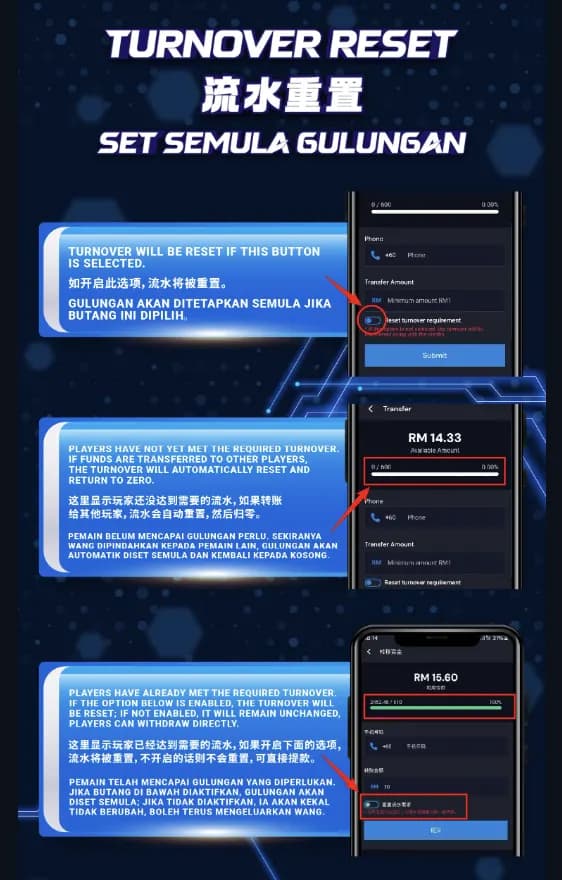
Turnover Reset: What You Should Know
Pressing Turnover Reset returns the current turnover figure to zero. Treat the control with care.
If the requirement is still open
Transfers to other players will also zero the turnover. Finish the requirement before moving funds.
If the target is already met
You may enable the reset toggle, or leave it off and proceed to withdraw with the current status intact.

How to Share AiPLAY
Inviting someone takes four short movements:
1. Open the menu
Use the menu on your dashboard to reveal the options.
2. Choose Share
The Share icon sits among the usual controls.
3. Share Now
Confirm with Share Now to prepare the invitation.
4. Pick a channel
Send it through a social network, or save the QR code and pass it along however you prefer.
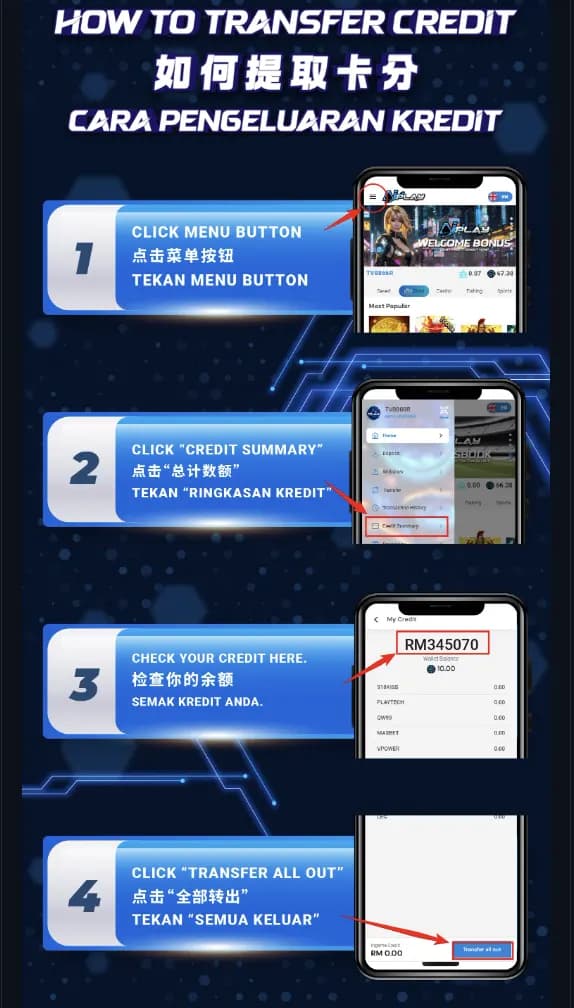
How to Transfer Credit
Moving credit is a brief sequence:
Open the menu
The dashboard menu holds every transfer control.
Credit Summary
Open Credit Summary to see what is available.
Confirm the balance
Check the figure before you send it.
Transfer All Out
Complete the move with Transfer All Out.

How to Claim a Downline Rebate
Downline rebates can reach as high as $55,400. Collect them as follows:
Open Profile
Tap the profile icon to reach account settings.
Open Invite
The Invite area lists referral activity.
Claim Rebate
Tap Claim Rebate to collect what you have earned.
The Floor Is Open
Join AiPLAY for a calmer kind of entertainment — and a membership that returns something. Register below when you are ready.